
Laptops have been one of the biggest gaps on PC Wizard Hub — and for good reason: the budget gaming laptop market has genuinely leveled up in 2026. Under $800 now regularly gets you a real NVIDIA RTX 40-series GPU, a 144Hz+ display, and enough RAM to actually game without compromise.
We compared five of the strongest options across performance, build quality, and value. Here’s what actually delivers under $800 right now.
🔥 What $800 Actually Buys You in 2026
- GPU floor: RTX 3050 at the low end, RTX 4050 at the high end of this budget
- Display: 144Hz+ FHD IPS is now the norm, not a premium extra
- RAM: prioritize 16GB over 8GB before chasing a better GPU tier
📦 All five are available directly on Amazon, often with seasonal deals pushing them below sticker price.
📊 Quick Comparison Table
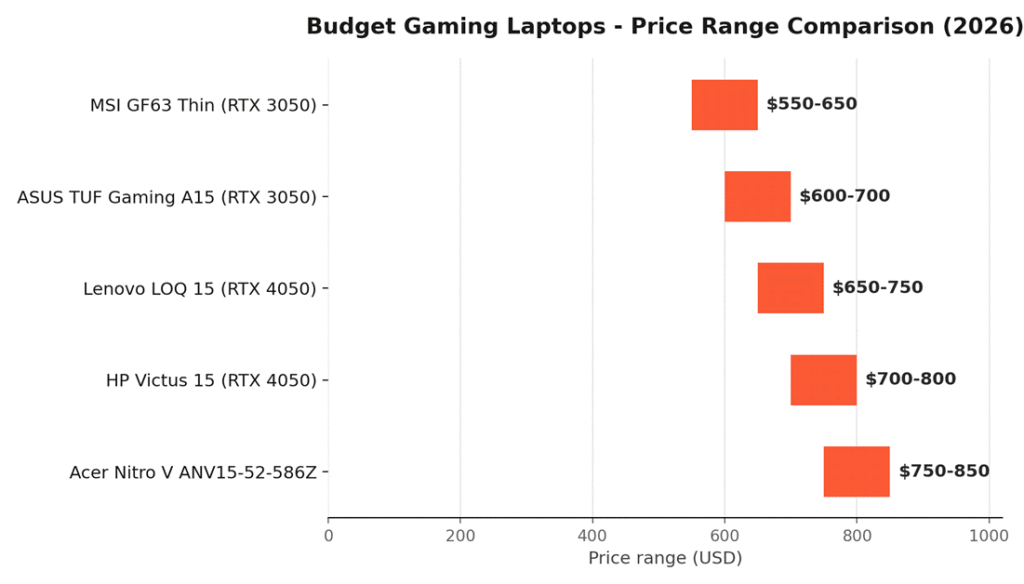
| Laptop | GPU | Best For | RAM | Price |
| 🛒 Acer Nitro V ANV15-52-586Z | RTX 4050 | Best Display | 8GB | ~$750–850 |
| 🛒 HP Victus 15 | RTX 4050 | Best Overall | 8GB | ~$700–800 |
| 🛒 Lenovo LOQ 15 | RTX 4050 | Best Gaming Perf. | 16GB | ~$650–750 |
| 🛒 ASUS TUF Gaming A15 | RTX 3050 | Most Durable | 16GB | ~$600–700 |
| 🛒 MSI GF63 Thin | RTX 3050 | Lightest / Esports | 16GB | ~$550–650 |
Prices fluctuate with Amazon deals — check the live listing for current pricing.
- All five run 1080p gaming at medium-high settings in current titles
- RTX 4050 models handle higher refresh rates better; RTX 3050 models trade some FPS for a lower price or better chassis
🏆 1. HP Victus 15 — Best Overall
The 🛒 HP Victus 15 hits the best balance of GPU tier, display quality, and price of anything on this list — the safest pick if you just want one solid all-rounder.
Why it’s here:
- RTX 4050 (6GB GDDR6) paired with a 144Hz FHD IPS display
- AMD Ryzen 5 8645HS — a genuinely modern 6-core/12-thread chip
- 512GB PCIe Gen4 SSD keeps load times short
- Backlit keyboard and Wi-Fi 6 as standard
Good for: Anyone who wants a single laptop that handles both gaming and everyday use without weak spots.
🎥 2. Acer Nitro V ANV15-52-586Z — Best Display
If refresh rate matters more to you than anything else, the 🛒 Acer Nitro V ANV15-52-586Z is the pick — it’s one of the few laptops in this budget with a 165Hz panel.
Why it’s here:
- 165Hz FHD IPS display — rare at this price point
- RTX 4050 GPU with Intel Core i5-13420H
- Wi-Fi 6 and a backlit keyboard included
- 512GB Gen4 SSD for fast game load times
Good for: Competitive players who want the smoothest motion on screen, even on a tight budget.
💪 3. Lenovo LOQ 15 — Best Gaming Performance
The 🛒 Lenovo LOQ 15 pairs the same RTX 4050 GPU with 16GB of RAM out of the box — no upgrade needed before you start gaming seriously.
Why it’s here:
- RTX 4050 (6GB GDDR6) with 115W TGP for strong sustained performance
- 16GB RAM standard — no immediate upgrade needed
- 144Hz FHD IPS display with G-Sync support
- AMD Ryzen 5 7235HS handles multitasking well alongside gaming
Good for: Buyers who don’t want to budget separately for a RAM upgrade right after purchase.
🛡️ 4. ASUS TUF Gaming A15 — Most Durable
Built to MIL-STD-810H testing standards, the 🛒 ASUS TUF Gaming A15 trades GPU tier for a chassis that’s built to survive drops, vibration, and heavy daily use.
Why it’s here:
- MIL-STD-810H tested — drop, vibration, and temperature resilience
- 16GB DDR5 RAM standard at this price point
- Dual Arc Flow Fans keep thermals in check under load
- RTX 3050 GPU — a step down in raw power, but sufficient for 1080p esports and medium-setting AAA gaming
Good for: Students, frequent travelers, or anyone who needs a laptop that can take a beating.
🪶 5. MSI GF63 Thin — Lightest / Esports Pick
If portability is the priority, the 🛒 MSI GF63 Thin is the lightest machine here — and still packs enough GPU for competitive esports titles.
Why it’s here:
- Slim aluminum chassis — noticeably lighter than the rest of this list
- RTX 3050 (4GB GDDR6) — comfortably handles Valorant, CS2, and similar esports titles at high framerates
- 16GB RAM and a 512GB NVMe SSD
- 144Hz FHD display keeps motion smooth for competitive play
Good for: Students and esports players who carry their laptop daily and don’t need AAA-at-max-settings performance.
❓ Frequently Asked Questions
Is RTX 4050 worth paying more for over RTX 3050?
Yes, if your budget stretches to it — RTX 4050 delivers meaningfully better frame rates in demanding titles and has more headroom for future games. RTX 3050 is still a perfectly capable choice for esports titles and older/less demanding AAA games at 1080p.
Should I prioritize RAM or GPU tier on a tight budget?
RAM first. 8GB is genuinely limiting for modern gaming and multitasking together — several picks here ship with 16GB standard at a lower price than 8GB RTX 4050 configs. You can’t easily upgrade a soldered GPU, but RAM is sometimes user-upgradable depending on the model.
Do any of these handle 1440p or ray tracing well?
Not comfortably. These GPUs (RTX 3050/4050) are built for smooth 1080p gaming at medium-high settings. Ray tracing and 1440p are technically possible in lighter titles but expect to lower settings significantly.
Which one should I buy if I only care about esports titles (Valorant, CS2, Fortnite)?
The MSI GF63 Thin or ASUS TUF Gaming A15 — both comfortably hit high framerates in esports titles without paying for GPU headroom you won’t use.
🔗 Related Reading
- How to Choose the Right PC Parts for Your First Build (2026 Guide)
- Build the Ultimate Budget Gaming PC (2026 update) for Under $700
- Best Capable Budget GPUs for 1080p Gaming in 2026
⚔️ Final Verdict
For most budget builders, the HP Victus 15 is the safest all-around pick — it doesn’t compromise on GPU, display, or build quality. If a smooth display matters most, go Acer Nitro V. Want maximum RAM and gaming performance out of the box? Lenovo LOQ 15. Need something that survives daily abuse? ASUS TUF Gaming A15. And if portability and esports performance are your priority, the MSI GF63 Thin won’t let you down.
As an Amazon Associate, PC Wizard Hub earns from qualifying purchases made through the links above.