
If you’ve read our individual reviews of the Ryzen 7 5700X3D and Ryzen 7 7800X3D, you already know both are excellent budget gaming CPUs. But which one should you actually buy? The honest answer depends less on the CPU itself and more on which platform you’re already on — or willing to buy into.
Here’s the real breakdown: performance, platform cost, and who each chip actually makes sense for.
🔥 The Quick Answer
- Already on AM4 (older motherboard/DDR4)? Get the 5700X3D — it’s a drop-in upgrade with no new motherboard or RAM needed
- Building fresh or want AM5 longevity? Get the 7800X3D — faster, and the platform will take future CPU upgrades
- Tightest possible budget? 5700X3D plus an existing AM4 board still wins on total cost
📦 Both are available directly on Amazon, often with seasonal deals pushing them below sticker price.
📊 Spec Comparison
| Spec | 5700X3D | 7800X3D |
| Platform | AM4 | AM5 |
| Architecture | Zen 3 | Zen 4 |
| Cores / Threads | 8 / 16 | 8 / 16 |
| L3 Cache | 96MB | 96MB |
| Boost Clock | 4.1 GHz | 5.0 GHz |
| TDP | 105W | 120W |
| Memory | DDR4 | DDR5 |
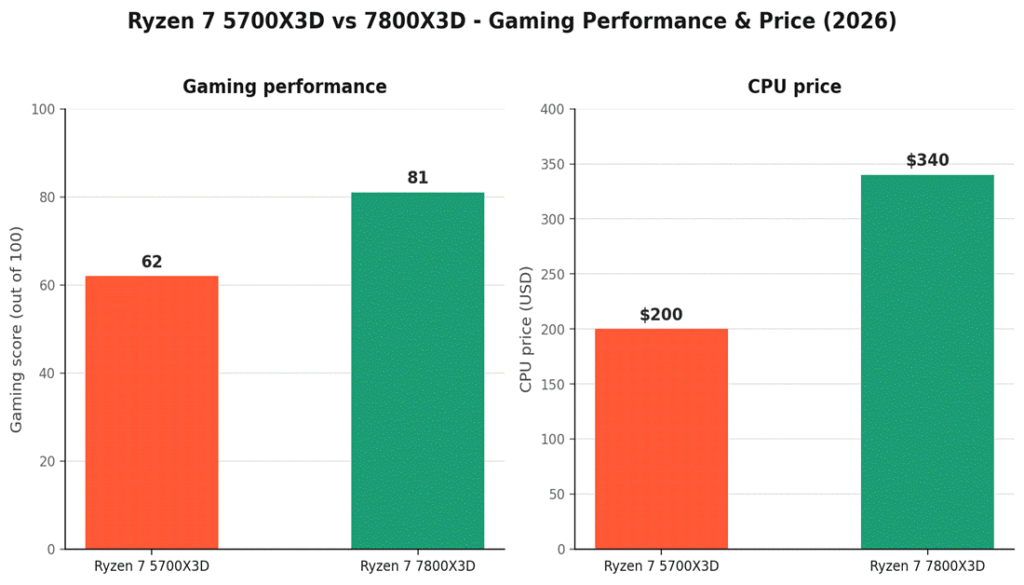
| Gaming score (out of 100) | 62 | 81 |
| CPU Price | 🛒 ~$180–230 | 🛒 ~$325–360 |
Prices fluctuate with Amazon deals — check the live listings for current pricing.
- Both chips carry the full 96MB of 3D V-Cache that makes AMD’s X3D lineup so strong for gaming
- The core performance gap comes almost entirely from architecture (Zen 3 vs Zen 4) and clock speed, not cache
🎮 Gaming Performance
Across 100+ games, the 7800X3D benchmarks roughly 30% faster on average than the 5700X3D, scoring 81/100 vs 62/100 in aggregate gaming ratings. That gap holds at both 1080p and 1440p, and widens further with a strong GPU paired to it — the 5700X3D’s Zen 3 architecture and lower boost clock become more of a limiting factor as GPU horsepower increases.
That said, 62/100 is still a genuinely solid score. Paired with a mid-range GPU like an RTX 4060, the 5700X3D won’t bottleneck most builds at 1080p — the gap matters most if you’re running a higher-end GPU or gaming at 1440p/144Hz+.
💰 The Platform Cost Nobody Mentions
This is the part that actually decides most people’s answer. The CPU price gap (~$150) is only half the story:
- 5700X3D: drops into any existing AM4 motherboard with a BIOS update — keep your current DDR4 RAM, case, and cooler
- 7800X3D: requires an AM5 motherboard and DDR5 RAM — add $150–250+ to the total if you’re building fresh
- If you’re already on AM4, upgrading to the 7800X3D means replacing motherboard, RAM, and CPU all at once — easily $500+ total
- If you’re building fresh with no existing parts, the platform cost gap narrows since you’re buying a motherboard either way
✅ Who Should Buy the 5700X3D
The 🛒 Ryzen 7 5700X3D is the better buy if any of these apply to you:
- You already own an AM4 motherboard and DDR4 RAM
- You’re gaming at 1080p with a mid-range GPU (RTX 4060-class or below)
- Total build cost matters more to you than squeezing out maximum FPS
- You’re upgrading an existing PC rather than building from scratch
✅ Who Should Buy the 7800X3D
The 🛒 Ryzen 7 7800X3D is the better buy if any of these apply to you:
- You’re building a new PC from scratch with no existing AM4 parts to reuse
- You’re pairing it with a stronger GPU (RTX 4070-class or above) or gaming at 1440p+
- You want platform longevity — AM5 will support newer CPU generations for years
- You want the strongest gaming performance available at this price tier, full stop
❓ Frequently Asked Questions
Is the performance gap actually noticeable in real gameplay?
Yes, especially at 1440p or with a stronger GPU — a 30% average gap shows up as meaningfully higher and more consistent frame rates, particularly in CPU-bound titles like simulation and strategy games. At 1080p with a mid-range GPU, the gap is present but less likely to be the bottleneck you notice first.
Can I put a 5700X3D in any AM4 motherboard?
Most B450/X470 boards and newer support it with a BIOS update, but always check your specific motherboard’s AMD compatibility list before buying — some early B350 boards need a BIOS flash via a compatible CPU first.
Is AM5 worth it for future upgrades, or will it be replaced soon too?
AM5 has already outlived several new CPU generations without being replaced, and AMD has stated long-term support for the socket — it’s a safer long-term bet than AM4 was at a similar point, though no platform lasts forever.
Which one is better value per dollar?
The 5700X3D usually wins on raw performance-per-dollar if you already own AM4 parts. Once you factor in a full platform cost for a fresh build, the gap narrows significantly and the 7800X3D’s extra performance becomes easier to justify.
🔗 Related Reading
- AMD Ryzen 7 5700X3D Review: The Best AM4 Gaming CPU in 2026?
- Ryzen 7 7800X3D Just Dropped 30% — Is It the Best Gaming CPU Right Now?
- Best AM4 Budget Motherboards in 2026
- Best Budget AM5 CPU and Motherboard Combos in 2026
- Best Gaming CPUs of 2026 – Top Picks by Budget, Performance & Use Case
⚔️ Final Verdict
Neither CPU is the wrong choice — this really comes down to your existing setup and priorities. If you’re upgrading an existing AM4 system, the 5700X3D delivers a genuine performance boost for the lowest total cost, full stop. If you’re building fresh or want a platform with more room to grow, the 7800X3D’s 30% performance lead and AM5 longevity make it the stronger long-term pick, even at a higher price.
As an Amazon Associate, PC Wizard Hub earns from qualifying purchases made through the links above.