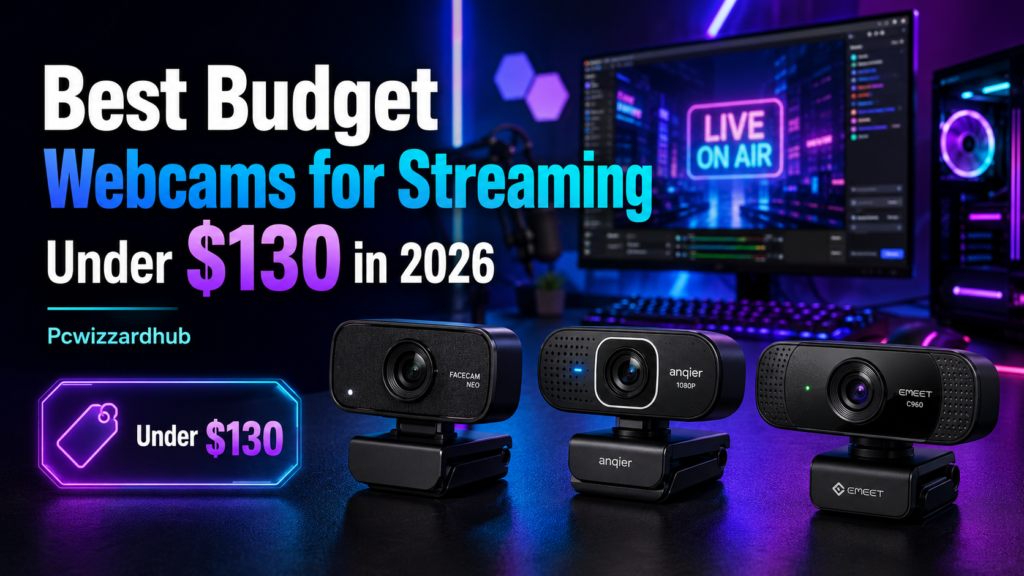
Webcams are the most overlooked upgrade in a budget streaming or work-from-home setup — and one of the cheapest to fix. Whether you’re on Zoom calls daily or building a Twitch setup, these five options cover every price point without wasting money on features you won’t use.
We compared reliability, image quality, and real-world value across five budget picks. Here’s what actually delivers.
🔥 What Matters Most in a Budget Webcam
- Resolution: 1080p/30fps is the practical floor — most platforms compress video heavily anyway
- Autofocus: matters more than resolution for looking sharp on calls
- Low-light performance: the single biggest quality difference between cheap and mid-range webcams
📦 All five are available directly on Amazon, often with seasonal deals pushing them below sticker price.
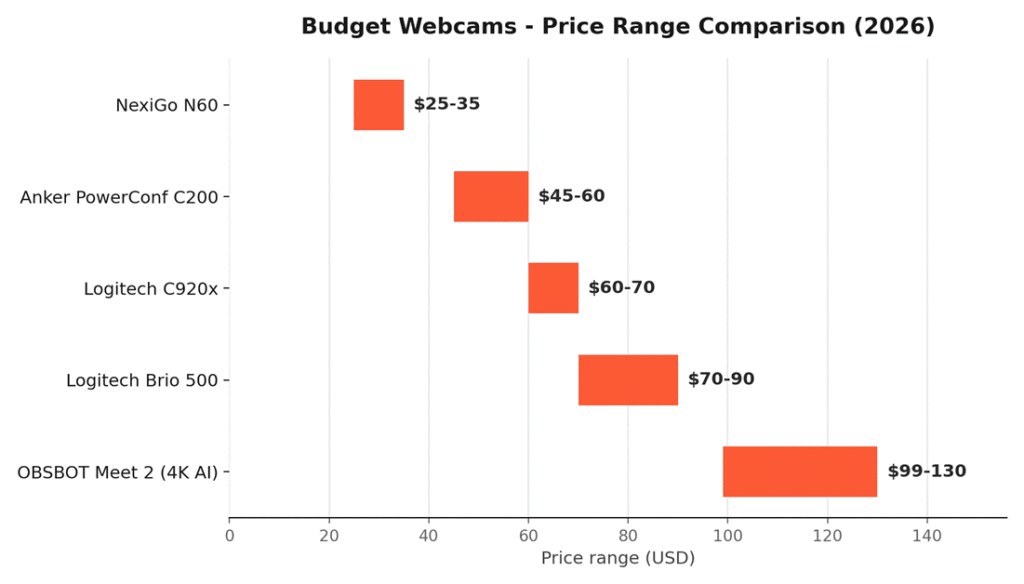
📊 Quick Comparison Table
| Webcam | Resolution | Best For | Mic | Price |
| 🛒 OBSBOT Meet 2 | 4K/30fps | Best AI Features | Dual | ~$99–130 |
| 🛒 Logitech Brio 500 | 1080p/30fps | Best for Video Calls | Dual NR | ~$70–90 |
| 🛒 Logitech C920x | 1080p/30fps | Best Overall | Dual | ~$60–70 |
| 🛒 Anker PowerConf C200 | 2K/30fps | Best 2K Value | Dual AI | ~$45–60 |
| 🛒 NexiGo N60 | 1080p/30fps | Cheapest Pick | Single | ~$25–35 |
Prices fluctuate with Amazon deals — check the live listing for current pricing.
- All five work plug-and-play with Zoom, Teams, Google Meet, OBS, and Discord
- Autofocus and privacy covers are standard across every pick here, even the cheapest
🏆 1. Logitech C920x — Best Overall
The 🛒 Logitech C920x has been the streaming-webcam standard for over a decade for a reason — it’s reliable, works with virtually every platform, and holds up well against far newer competitors.
Why it’s here:
- Full 1080p/30fps video with reliable autofocus
- Dual stereo mics with light correction built in
- Works out of the box with Zoom, Teams, Meet, OBS, and consoles
- A decade of driver support and community troubleshooting behind it
Good for: Anyone who wants the safest, most universally compatible pick with zero surprises.
🌟 2. Logitech Brio 500 — Best for Video Calls
If you’re on video calls more than you stream, the 🛒 Logitech Brio 500 is built specifically for that — auto-framing and light correction do a lot of the work for you.
Why it’s here:
- RightLight 4 auto light correction handles poor lighting automatically
- Auto-framing keeps you centered even if you move around
- Dual noise-reducing mics filter out background sound
- Show Mode lets you tilt the camera down to present physical objects
Good for: Remote workers and hybrid-meeting regulars who want to look polished with zero setup effort.
💰 3. Anker PowerConf C200 — Best 2K Value
The 🛒 Anker PowerConf C200 punches above its price with 2K resolution and AI noise cancellation — features usually reserved for pricier webcams.
Why it’s here:
- 2K resolution — sharper than most webcams at this price
- AI-powered noise-canceling mics, ideal for noisy home environments
- Low-light correction and adjustable field of view
- Built-in sliding privacy cover
Good for: Budget buyers who want a genuine resolution step up without paying premium prices.
🤖 4. OBSBOT Meet 2 — Best AI Features
If you want to stretch the budget for genuinely different features, the 🛒 OBSBOT Meet 2 brings AI auto-framing and gesture control that no other webcam in this list offers.
Why it’s here:
- 4K resolution with a large 1/2″ sensor — unusually good low-light performance for the price
- AI auto-framing keeps you centered automatically, even moving around
- Gesture control — zoom or toggle framing with hand gestures, no app needed mid-call
- Dual omnidirectional mics with noise reduction
Good for: Streamers and remote workers who want standout AI features and don’t mind paying toward the top of this budget range.
🪶 5. NexiGo N60 — Cheapest Pick
For a spare webcam, a first setup, or simply the tightest possible budget, the 🛒 NexiGo N60 covers the basics reliably without cutting corners that matter.
Why it’s here:
- Solid 1080p/30fps video from a 2MP CMOS sensor
- 110-degree wide-angle lens — good for group calls or a wider desk setup
- Built-in privacy cover and plug-and-play USB setup
- Consistently rated well for the price across thousands of reviews
Good for: First-time buyers, backup webcams, or anyone who just needs “good enough” without spending much.
❓ Frequently Asked Questions
Do I need 4K for streaming, or is 1080p enough?
1080p is enough for almost everyone. Most streaming platforms compress video heavily, so a well-lit 1080p feed often looks better on stream than a noisy or poorly-lit 4K feed. 4K is worth it mainly if you crop, reframe, or record for later editing.
What actually makes the biggest visual difference between cheap and mid-range webcams?
Low-light performance. Resolution numbers look similar on paper, but a webcam with better light correction or a bigger sensor (like the OBSBOT Meet 2’s 1/2″ sensor) will look noticeably clearer in typical home lighting than a basic sensor at the same resolution.
Is a built-in laptop webcam good enough, or is a dedicated one worth it?
A dedicated webcam is almost always a meaningful upgrade — even the cheapest pick here (NexiGo N60) outperforms most built-in laptop cameras in autofocus, low-light handling, and mic quality.
Does a privacy cover matter?
It’s a nice-to-have, not a dealbreaker — all five picks here include one, so it’s not a differentiator in this roundup, but worth checking on any webcam outside this list.
🔗 Related Reading
- Best Budget Gaming Keyboards & Mice in 2026 Under $100
- Top Gifts for PC Gamers – 2026 Holiday Guide
- How to Set Up Dual Monitors on Windows 11 Like a Pro
⚔️ Final Verdict
For most people, the Logitech C920x is the safest all-around pick — reliable, universally compatible, and proven over a decade of use. If video calls are your main use case, go Logitech Brio 500 for its auto-framing and light correction. Want a genuine resolution upgrade on a budget? Anker PowerConf C200. If you want standout AI features and don’t mind stretching the budget, the OBSBOT Meet 2 delivers features nothing else here matches. And if you just need something reliable for as little as possible, the NexiGo N60 won’t let you down.
As an Amazon Associate, PC Wizard Hub earns from qualifying purchases made through the links above.