
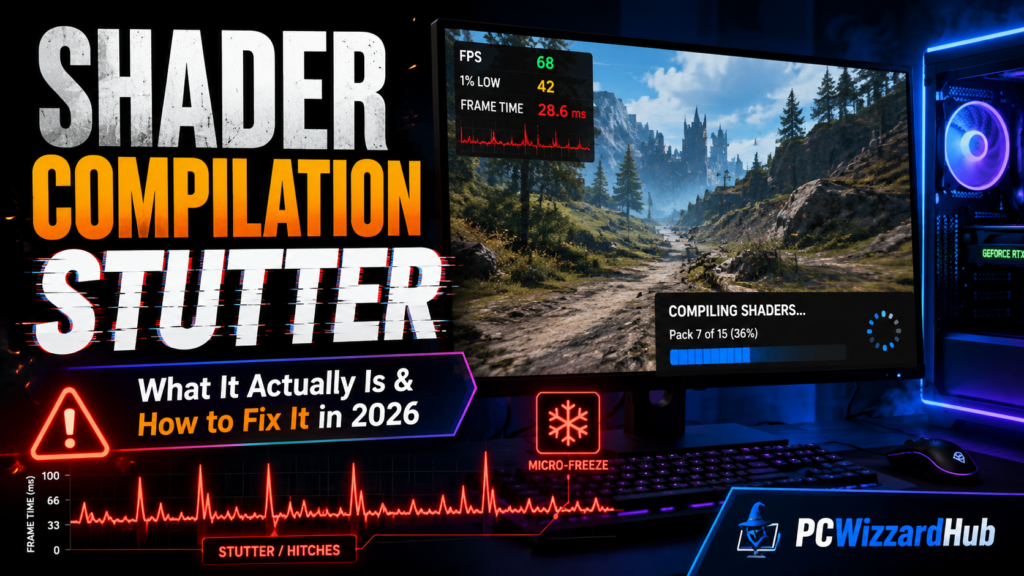
If your game runs at a smooth 100+ FPS but still hitches every time a new enemy appears, you enter a new area, or a spell effect fires for the first time — that’s not a performance problem in the traditional sense. It’s shader compilation stutter, and no amount of GPU horsepower will fix it on its own. Here’s what’s actually happening, why it’s gotten worse in recent years, and the fixes that genuinely help.
⚡ Quick Answer
- What it is: a brief freeze (50–500ms) that happens when your GPU compiles a shader program in real time, the first time a specific visual effect or object appears
- Why it happens: in DX12 and Vulkan, shader compilation responsibility shifted from the graphics driver to the game engine — and many games handle it poorly
- Will a better GPU fix it? No. A faster GPU renders frames quicker between stutters, but doesn’t compile shaders faster — don’t spend money on hardware to solve this
- What actually helps: letting precompilation screens finish, keeping GPU drivers current, increasing shader cache size, and giving a game one “warmup” session after any driver or game update
🤔 What Shader Compilation Stutter Actually Is
Every visual effect in a game — a texture, a lighting effect, a particle system — needs a compiled shader program before your GPU can render it. Consoles solve this easily: since a PS5 or Xbox Series X has fixed, known hardware, developers can pre-compile every shader ahead of time and ship it with the game. There’s no compilation happening during play, so no stutter from this cause.
PC gaming doesn’t have that luxury. Your GPU might be an RTX 5090, an RX 8800 XT, or an Intel Arc B580 — each needs shaders compiled specifically for its architecture, and developers can’t realistically pre-compile for every possible hardware combination in advance. Some games solve this with a “Compiling Shaders” loading screen before you start playing. Others skip that step and compile shaders the instant they’re needed mid-gameplay — which is the exact moment you feel a stutter.
📉 Why It’s Gotten Worse in Recent Years
This didn’t used to be as common a complaint. Under the older DX11 API, the graphics driver handled shader compilation automatically and transparently. Under DX12 and Vulkan, that responsibility shifted to the game engine itself — and implementation quality varies enormously between studios. Unreal Engine 5 in particular compiles enormous numbers of shader permutations for its Nanite geometry and Lumen lighting systems, which is part of why UE5 titles like Fortnite and Tekken 8 are frequently cited as some of the worst offenders.
Console ports compound the problem: a game built and tuned for one fixed hardware target, then adapted for the wildly varied PC hardware landscape, often ships with an under-engineered PC-side shader pipeline — sometimes described as a lower-priority afterthought in the porting process rather than a deliberate design choice.
🚫 Myth: “I Just Need a Better GPU”
This is the single most common (and expensive) mistake people make chasing this problem. GPU compute power affects how fast frames render once shaders are compiled — it does not affect how fast the shader compilation itself happens. Upgrading from a mid-range card to a flagship one will not make compilation stutters shorter or less frequent; you’ll simply get higher frame rates in between them.
If you’re budgeting for a GPU upgrade specifically to fix stuttering, save your money and work through the fixes below first — they cost nothing and address the actual cause.
🔧 The Real Fixes, Ranked by Impact
- 1. Let precompilation screens finish completely. Don’t skip or alt-tab out of a “Compiling Shaders” loading screen — on some systems this pauses the process rather than continuing in the background, meaning you’ll hit the same compilation mid-gameplay instead.
- 2. Increase your shader cache size. NVIDIA defaults to 10GB (Control Panel → Manage 3D Settings → Shader Cache Size → set to Unlimited); AMD defaults to 8GB in Adrenalin software. If you play many different games, this cache fills up and starts evicting older games’ cached shaders — causing them to re-stutter the next time you play.
- 3. Update drivers cleanly, not just “update.” Use DDU (Display Driver Uninstaller, a free tool) to fully remove old driver files before installing a new version, rather than installing over the top — partial driver conflicts are a common source of shader cache corruption.
- 4. Don’t routinely clear your shader cache. Only clear it when actively troubleshooting corruption. Clearing it “just in case” forces every game to recompile everything from scratch on its next launch.
- 5. Give games one “warmup” session after any driver or game update. A driver update or game patch commonly invalidates part of the existing shader cache. Play a low-pressure opening section once before judging performance — don’t benchmark immediately after an update and declare something broken.
- 6. Use a fast SSD. Shader cache read/write speed and general asset streaming both benefit from NVMe storage over a mechanical hard drive or even SATA SSD — this won’t eliminate compilation stutter, but it reduces related streaming hitches that often get mistaken for the same problem.
If you’re still on a SATA SSD or HDD, a drive like the 🛒 Crucial P310 is a reasonably priced NVMe upgrade that helps with this specific symptom, though it won’t touch true shader compilation stutter itself.
- 7. Cap your frame rate instead of running uncapped. An in-game frame limiter (preferred) or driver-level cap, set a few frames below your monitor’s max refresh, keeps GPU usage from constantly pegging at 100% — which can make any stutter feel more jarring by contrast.
🎮 Unreal Engine 5 Specific Notes
If the stuttering game is built on UE5 (Fortnite, Tekken 8, and most UE5.4-based titles share similar symptoms), some players have found modest relief by adjusting shader-related settings in the game’s config files, typically located under %LOCALAPPDATA%\[GameName]\Saved\Config\WindowsNoEditor. These tweaks vary by title and aren’t officially supported, so back up config files before editing and expect a game update to potentially reset or invalidate your changes.
🔮 What’s Coming: Microsoft’s Advanced Shader Delivery
At GDC 2026, Microsoft announced Advanced Shader Delivery (ADC) for Windows, arriving via AgilitySDK 1.619. The system delivers shaders pre-compiled for your exact GPU model as part of game installation, rather than compiling them during play — directly targeting the root cause covered in this guide. NVIDIA has confirmed GeForce RTX support later in 2026, with Unreal Engine integration planned, though early support may be limited to games sold through the Xbox PC storefront. This won’t retroactively fix already-released games, but it’s a genuine structural fix for titles that adopt it going forward.
🔎 Is It Actually Shader Stutter? Quick Diagnostic
| Symptom | Likely Cause | What To Do |
| Hitches only in new areas or on first playthrough | Shader compilation stutter | Apply the fixes above; expect it to improve on repeat visits |
| Hitches everywhere, even in familiar areas | CPU bottleneck or background processes | Check Task Manager for background load; consider a CPU-focused bottleneck check |
| Stutter right after a driver update, then fine | Cache invalidation (normal) | Give it one warmup session before troubleshooting further |
| Consistent low FPS, not brief hitches | GPU/CPU performance limit, not stutter | This is a different problem — review in-game settings and hardware headroom |
| Long freezes (seconds) when entering new zones | Asset streaming from slow storage | An SSD upgrade helps this specific symptom, unlike pure shader stutter |
❓ Frequently Asked Questions
Will shader stutter ever go away in a game I already own?
It typically improves significantly after the shader cache fully populates — usually within your first few hours of play, assuming your cache isn’t being evicted by other games. It rarely disappears completely in poorly-optimized titles, but the frequency drops sharply after initial exposure to most of the game’s content.
Does this affect AMD and Nvidia GPUs equally?
Both are affected by the same underlying engine-side issue, though driver-level shader cache handling differs slightly between the two (10GB default on Nvidia vs 8GB on AMD). Neither vendor has fully solved this at the driver level as of 2026 — it requires engine and OS-level changes like Microsoft’s upcoming Advanced Shader Delivery.
Is this the same thing as regular lag or ping issues?
No — shader compilation stutter is a local rendering issue that happens even in single-player, offline games. Network lag and ping spikes are a completely separate problem related to your internet connection and the game server, not your GPU.
Should I disable Nanite/Lumen in UE5 games to avoid this?
If a game exposes that option (most don’t, since it’s often baked into the rendering pipeline), disabling advanced UE5 features can reduce the number of unique shaders needed, which may reduce stutter frequency at the cost of visual fidelity. Check each game’s specific graphics settings menu.
🔗 Related Reading
- Beginner’s Guide to PC Bottlenecks (2026)
- Best Budget SSDs for Gaming in 2026 (Fast, Cheap & Reliable)
⚔️ Final Verdict
Shader compilation stutter is one of the few PC gaming problems where the intuitive fix — throw more hardware at it — genuinely doesn’t work. The real fixes are free: let precompilation finish, keep your shader cache generous and undisturbed, update drivers cleanly, and give games one warmup session after any update. If you’ve worked through all of that and stuttering persists everywhere rather than just on first encounters, the problem likely isn’t shader compilation at all — it’s worth checking for a CPU bottleneck or background software interference instead.
This is a fast-evolving area of PC gaming as engines and driver support change — we’ll revisit this guide as Microsoft’s Advanced Shader Delivery and similar fixes roll out more broadly.