
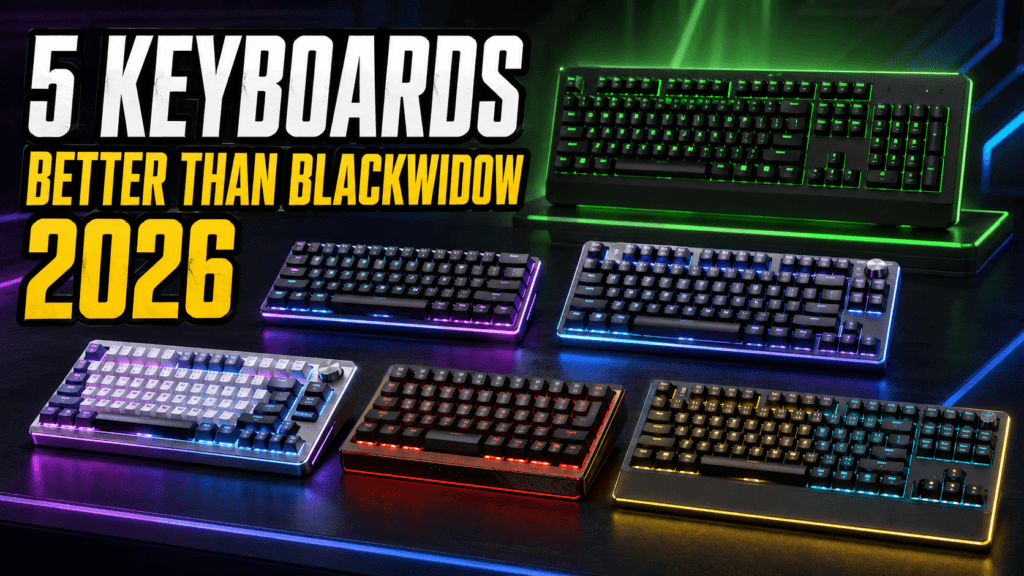
The Razer BlackWidow has been the go-to gaming mechanical keyboard recommendation for over a decade, and it’s still a genuinely solid board — full aluminum construction, tactile clicky Green switches, and broad availability. But the base BlackWidow V3 has no hot-swap sockets, no wireless, and a typing feel that hasn’t fundamentally changed in years while the rest of the market has moved toward gasket mounts, sound dampening, and swappable switches. Here are five genuinely better options, each for a different reason.
⚡ Quick Answer
- Want to stay in the Razer ecosystem, but wireless? Razer BlackWidow V3 Pro — same switches, cuts the cord
- Want the most modern typing feel money can buy? ASUS ROG Azoth — gasket mount, hot-swap, OLED display
- Want genuine hot-swap flexibility at a fair price? Keychron V3 Max — wireless, hot-swappable, works with Mac and Windows
- Want a rival brand’s take on the classic full-size formula? Corsair K70 RGB Pro — aluminum frame, Cherry MX switches, often cheaper than the BlackWidow
- Want the cheapest real upgrade? Redragon K552 — genuine mechanical switches for a fraction of the price
📊 Price Comparison
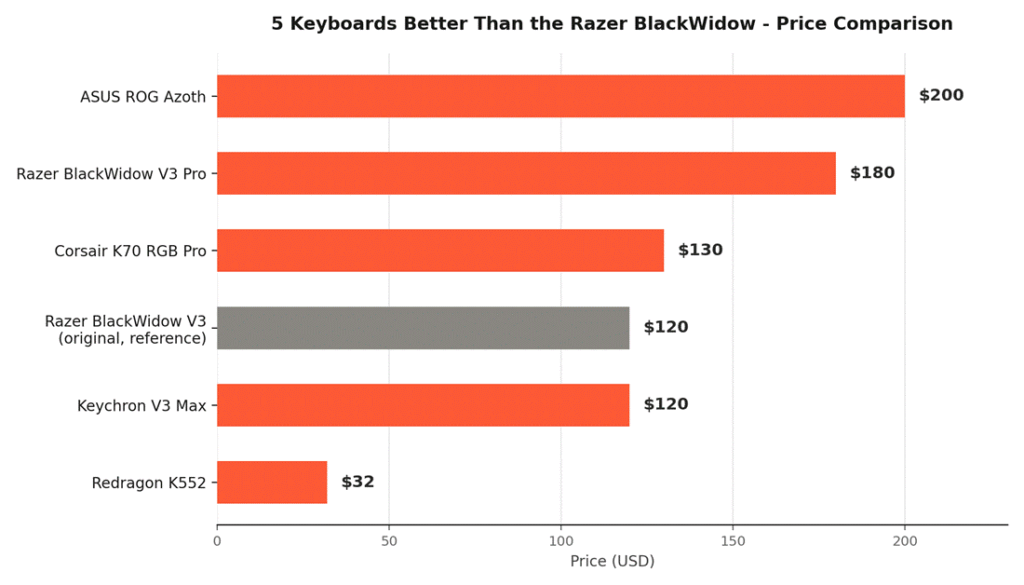
None of these alternatives require paying dramatically more than the BlackWidow V3 itself, and the cheapest one on this list costs a fraction of it — hot-swap sockets and wireless connectivity have become standard features across the market, not exclusively premium ones.
📊 Spec Comparison
| Keyboard | Connection | Hot-Swap | Best For | Price |
| Razer BlackWidow V3 (original) | Wired | No | Reference point | ~$120 |
| 🛒 Razer BlackWidow V3 Pro | Wireless | No | Wireless Upgrade | ~$120–230 |
| 🛒 ASUS ROG Azoth | Wireless (Tri-Mode) | Yes | Premium/Modern | ~$200 |
| 🛒 Keychron V3 Max | Wireless (Tri-Mode) | Yes | Hot-Swap Value | ~$114–130 |
| 🛒 Corsair K70 RGB Pro | Wired | No | Rival Brand Pick | ~$100–170 |
| 🛒 Redragon K552 | Wired | No | Cheapest Upgrade | ~$30–35 |
Prices fluctuate with Amazon deals — check the live listings for current pricing.
📡 1. Razer BlackWidow V3 Pro — Best Wireless Upgrade (Same Brand)
The 🛒 Razer BlackWidow V3 Pro is Razer’s own answer to “what if the BlackWidow could go wireless” — same signature Green switches, same clicky feel, no cord.
Why it’s here:
- Three connectivity modes: Bluetooth, Razer HyperSpeed wireless, and USB-C wired
- Same Green mechanical switches (50g actuation) the BlackWidow line is known for
- Doubleshot ABS keycaps with extra-thick walls for durability
- Military-grade metal top plate rated for 80 million keystrokes
Good for: Longtime BlackWidow fans who want to cut the cord without changing anything else about how it feels.
🏆 2. ASUS ROG Azoth — Best Premium/Modern Alternative
The 🛒 ASUS ROG Azoth represents how far keyboard design has moved since the BlackWidow’s original formula — gasket mount, hot-swap switches, and genuine DIY customization out of the box.
Why it’s here:
- Gasket-mount design with three-layer internal dampening for a noticeably softer, more cushioned keystroke
- Hot-swappable, pre-lubed switches — swap feel or sound without any soldering
- OLED display for system info and on-the-fly settings adjustment
- Tri-mode connectivity: 2.4GHz wireless, Bluetooth, and wired USB-C
Good for: Enthusiasts who want the most current keyboard technology and don’t mind paying toward the top of this list for it.
🔧 3. Keychron V3 Max — Best Hot-Swap Value
The 🛒 Keychron V3 Max brings genuine hot-swap flexibility and wireless connectivity in at a price close to the BlackWidow V3 itself, without needing to spend Azoth-level money to get there.
Why it’s here:
- Hot-swappable sockets compatible with almost any 3-pin or 5-pin MX-style switch
- 2.4GHz wireless and Bluetooth 5.1, connecting up to 3 devices
- Gasket mount design with sound-absorbing foam for a noticeably quieter, softer feel than the BlackWidow’s rigid plate
- Full compatibility with macOS, Windows, and Linux, with included keycaps for both Mac and Windows layouts
Good for: Buyers who want real hot-swap and wireless flexibility without paying premium prices for it.
⚔️ 4. Corsair K70 RGB Pro — Best Rival Brand Pick
The 🛒 Corsair K70 RGB Pro takes the same “iconic full-size mechanical” formula as the BlackWidow and executes it with genuine Cherry MX switches and Corsair’s faster input processing.
Why it’s here:
- Genuine Cherry MX switches (Brown, Red, Blue, or Speed Silver depending on the listing) rather than a proprietary alternative
- AXON Hyper-Processing Technology processes input up to 8x faster than conventional keyboards, with 8,000Hz hyper-polling
- Durable anodized aluminum frame with per-key RGB and a detachable wrist rest
- Frequently discounted well below its $170 list price, often landing cheaper than the BlackWidow
Good for: Buyers who want the classic full-size gaming keyboard experience from a different, equally established brand.
🪶 5. Redragon K552 — Cheapest Real Upgrade
For a small fraction of the BlackWidow’s price, the 🛒 Redragon K552 delivers genuine mechanical switches and a metal plate construction without asking you to spend premium-keyboard money.
Why it’s here:
- True mechanical switches with satisfying tactile feedback, not a membrane imitation
- Metal plate construction for durability well beyond typical budget keyboards
- Compact 87-key tenkeyless layout that saves desk space
- A longtime budget-category favorite with a long track record
Good for: Anyone who wants a genuine mechanical keyboard experience without spending anywhere near BlackWidow money.
❓ Frequently Asked Questions
Is the Razer BlackWidow actually bad, or just outdated?
Outdated, not bad — it remains a well-built, reliable keyboard that plenty of people use happily. These alternatives reflect genuine advances (hot-swap sockets, gasket mounts, wireless flexibility) that have become standard across the market since the BlackWidow’s original design, not a case of the BlackWidow being poorly made.
Do I need hot-swappable switches, or is that just an enthusiast feature?
It’s genuinely useful even for non-enthusiasts — hot-swap lets you try a different switch feel (lighter, heavier, quieter) without buying a whole new keyboard, and it future-proofs your purchase if a switch ever fails. It’s not essential, but it’s a real practical advantage over a soldered board like the base BlackWidow.
Is wireless worth it for a gaming keyboard, or does it add latency?
Modern gaming-focused wireless (Razer HyperSpeed, Keychron’s 2.4GHz mode, ASUS SpeedNova) has latency essentially indistinguishable from wired in practice. Wired remains a perfectly reasonable choice if you’d rather not think about charging, not because wireless is a compromise.
Which of these is best for office/typing use, not just gaming?
The ASUS ROG Azoth and Keychron V3 Max both prioritize a cushioned, quieter typing feel through gasket mounting, making them noticeably more pleasant for extended typing sessions than the BlackWidow’s rigid, clicky-by-default design.
🔗 Related Reading
⚔️ Final Verdict
The BlackWidow earned its reputation, but 2026 offers a genuinely better option for almost every priority: the BlackWidow V3 Pro if you just want the same feel wireless, the ROG Azoth if you want the most current keyboard technology available, the Keychron V3 Max if you want hot-swap flexibility without premium pricing, the Corsair K70 RGB Pro if you want a rival brand’s take on the classic formula, or the Redragon K552 if price is the deciding factor. There’s no wrong pick here — only a question of which specific upgrade matters most to you.
As an Amazon Associate, PC Wizard Hub earns from qualifying purchases made through the links above.