
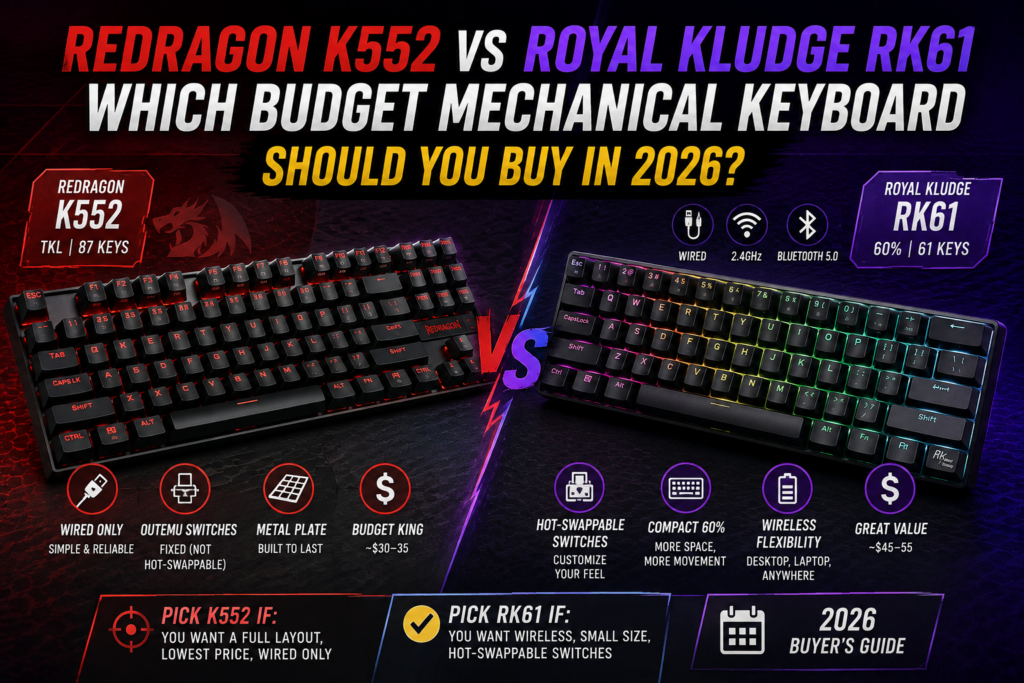
These are two of the most recommended entry points into mechanical keyboards, and they represent genuinely different philosophies: the K552 is a full-featured tenkeyless board built for durability at the lowest possible price, while the RK61 shrinks down to a 60% layout and adds wireless connectivity most budget boards skip entirely. Here’s which one actually fits how you game and type.
⚡ Quick Answer
- Pick the Redragon K552 if: you want a full navigation cluster and function row, the lowest possible price, or a wired-only setup you’ll never need to charge
- Pick the Royal Kludge RK61 if: desk space is tight, you want wireless flexibility, or you want hot-swappable switches to customize the feel later
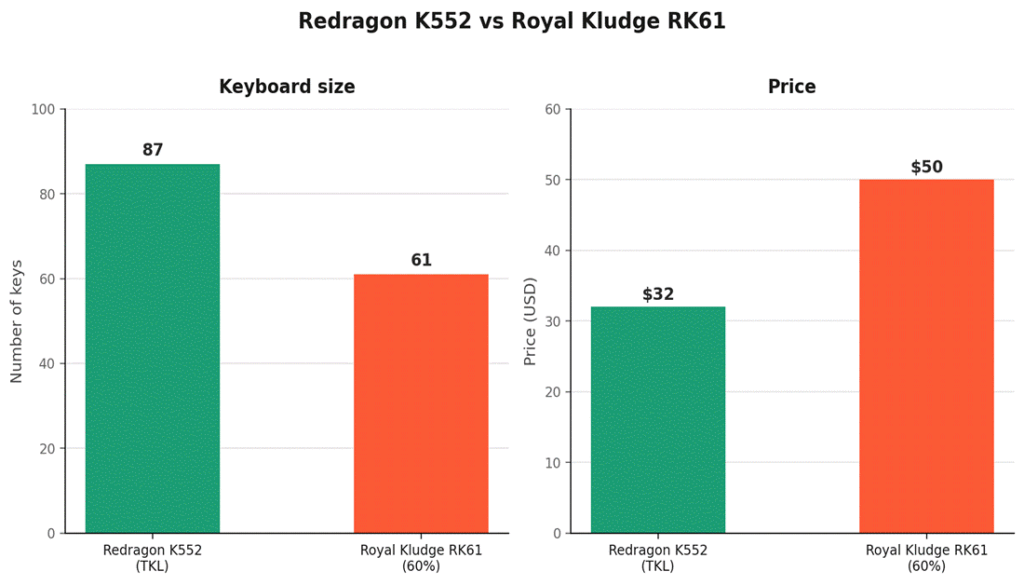
- Price gap: the K552 typically runs about $15–20 cheaper, reflecting its simpler wired-only, non-hot-swap design
📊 Spec Comparison
| Spec | Redragon K552 | Royal Kludge RK61 |
| Layout | TKL (87 keys) | 60% (61 keys) |
| Connectivity | Wired only | Wired, 2.4GHz, or Bluetooth 5.0 |
| Switches | Outemu (fixed) | Hot-swappable (Gateron/RK options) |
| Frame | Metal plate | Plastic (Pro version adds aluminum) |
| 🛒 Price | 🛒 ~$30–35 | 🛒 ~$45–55 |
Prices fluctuate with Amazon deals — check the live listings for current pricing.
📏 Layout: Full Navigation Cluster vs. Maximum Desk Space
The 🛒 Redragon K552 keeps a full arrow key cluster, dedicated navigation keys (Home/End/Page Up/Down), and a function row — everything a standard keyboard has, minus the numpad. For most people coming from a normal keyboard, this is the less jarring transition.
The 🛒 Royal Kludge RK61 strips down to just the alphanumeric block and a few modifier keys, relying on function-layer combinations (Fn + other keys) for arrows, navigation, and media controls. This frees up significant desk space for mouse movement — a real advantage for low-DPI, high-sensitivity gaming — but means a genuine adjustment period if you’re used to dedicated arrow keys.
🔌 Connectivity: The RK61’s Biggest Advantage
This is where the price gap earns its keep. The K552 is wired-only, full stop. The RK61 offers wired USB-C, 2.4GHz wireless, and Bluetooth 5.0 — genuinely rare flexibility at this price point, letting you switch between a desktop and a laptop or tablet without unplugging anything. If cutting the cord matters to you at all, this single feature likely settles the decision.
🔧 Switches: Fixed vs. Hot-Swappable
The K552 ships with Outemu switches (commonly Blue, Brown, or Red depending on the specific listing) soldered in place — what you buy is what you’re stuck with unless you’re comfortable desoldering. The RK61 uses a hot-swappable socket design, meaning you can pull out the stock switches and replace them with any compatible switch (Gateron, Cherry MX, and many boutique options) without any soldering. For anyone curious about trying different switch feels over time, this is a meaningful long-term advantage.
❓ Frequently Asked Questions
Is a 60% keyboard actually practical for daily use, or just for gaming?
It’s practical for both, but expect a real adjustment period if you frequently use arrow keys, function keys, or navigation keys for work — muscle memory for Fn-layer shortcuts takes a week or two to build. Many people adapt fully and never look back; others find they miss dedicated keys enough to prefer a TKL layout long-term.
Which one is better for competitive gaming specifically?
The RK61’s extra desk space is a genuine advantage for low-sensitivity, high-DPI play styles common in competitive FPS titles. That said, the K552’s dedicated arrow cluster and function row can matter for games with complex keybind layouts (MMOs, strategy games) where losing quick access to those keys is a real downside.
Can I put different keycaps on either of these?
Yes, both use standard-profile keycaps compatible with the broader aftermarket keycap ecosystem, though double-check the RK61’s specific bottom-row layout (spacebar and modifier widths can vary between 60% keyboard brands) before buying a keycap set designed for a different 60% board.
Do either of these work well for a laptop setup, not just desktop?
The RK61 is the clear choice here — its Bluetooth and compact footprint make it genuinely useful as a portable laptop companion. The K552’s wired-only connection and larger TKL footprint make it a desktop-only keyboard in practice.
🔗 Related Reading
⚔️ Final Verdict
If you want the simplest possible entry into mechanical keyboards at the lowest price, with a full set of keys you already know how to use, the Redragon K552 is the safer pick. If you value desk space, wireless flexibility, and the option to swap switches down the line, the Royal Kludge RK61’s extra $15–20 buys genuinely useful features you can’t add to the K552 later. Neither is a wrong choice — it comes down to whether you want simplicity or flexibility.
As an Amazon Associate, PC Wizard Hub earns from qualifying purchases made through the links above.