
No high-performance gaming PC is truly silent under full load — the realistic goal is a system quiet enough to forget it’s running during normal use, and unobtrusive rather than distracting under gaming load. That’s genuinely achievable on a budget, and it comes down to a handful of specific component choices rather than one magic part. Here’s exactly how to get there, step by step.
⚡ Quick Answer
- The three biggest noise sources: your CPU, GPU, and PSU together produce roughly 90% of a PC’s heat and noise — fix these first before touching anything else
- The core principle: fewer, larger, slower-spinning fans beat more small fast ones — a 140mm fan moves the same air as a 120mm fan at a lower, less distracting pitch
- The most overlooked fix: matching your GPU to your actual resolution and refresh rate — an overkill card running flat-out under load is usually the single loudest thing in the room
- Budget for this: roughly $250–300 on top of a normal build gets you a case, cooler, fans, and PSU genuinely built around quiet operation
🔍 Step 1: Understand What’s Actually Making Noise
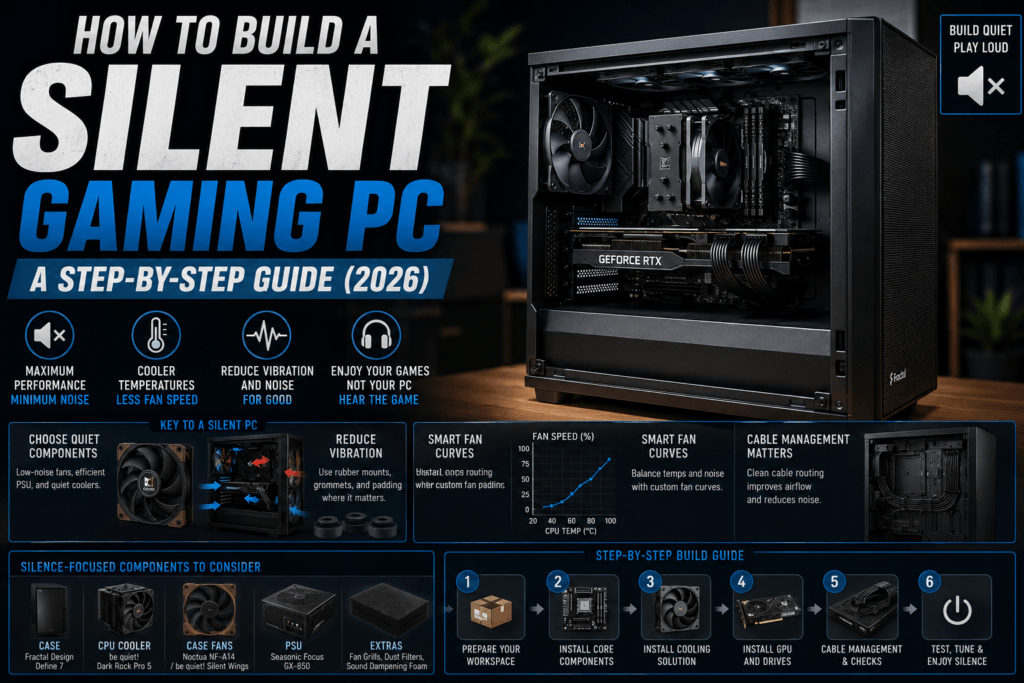
Before buying anything, it helps to know what you’re fighting. Noise from a PC comes from two genuinely different sources: airflow noise (fans pushing air, which increases with fan speed and blade design) and vibration noise (mechanical parts, especially spinning hard drives and loose fan mounts, transmitting buzz through the case panels). Silencing a PC means addressing both, not just buying quieter fans.
Since the CPU, GPU, and PSU generate the overwhelming majority of a system’s heat, they’re also responsible for most of its noise — improving airflow around these three components matters far more than any other single change you can make.
🏰 Step 2: Start With a Case Built for Silence
Case choice matters more than most builders assume. Look specifically for: sound-dampening foam on the front, side, and top panels; an enclosed PSU shroud that isolates the power supply’s fan noise; and decoupled, rubber-mounted drive bays that prevent vibration from transferring into the case frame.
The 🛒 be quiet! Pure Base 500 checks every one of these boxes: insulation mats on the front, sides, and top cover, a PSU shroud that hides both the cables and the power supply’s fan noise, and a double HDD cage with decoupled mountings specifically designed to reduce vibration. It also ships with two pre-installed 140mm fans, which is a meaningful head start on the next step.
❄️ Step 3: Upgrade to a Large, Slow CPU Cooler
The stock cooler that ships with most CPUs is sized to be adequate, not quiet — it compensates for a smaller heatsink by spinning faster under load. A larger aftermarket tower cooler gives the same (or better) cooling capacity with a bigger surface area, which means its fan can spin slower and stay quieter for the same thermal result.
The 🛒 Noctua NH-U12S is a longtime benchmark in this category — its single-tower design with five heat pipes and Noctua’s NF-F12 fan delivers genuinely quiet operation without needing a liquid cooling loop, which introduces its own pump noise. Air cooling is typically 3–5dB quieter than an equivalent AIO at the same performance level, so don’t assume liquid cooling is automatically the quieter choice.
🌀 Step 4: Replace Small, Fast Fans With Fewer, Larger, Slower Ones
This is the single highest-value swap for the money. A 140mm fan can move the same volume of air as a 120mm fan while spinning at a lower RPM, and lower RPM is what your ears actually notice — both as reduced volume and a lower, less fatiguing pitch.
The 🛒 Noctua NF-A14 PWM is one of the most-awarded 140mm case fans available, with PWM support for automatic speed control so it only spins up when actually needed, and a bundled low-noise adaptor to cap its maximum speed further if you want to prioritize silence over absolute cooling headroom.
🔌 Step 5: Choose a PSU With Genuinely Quiet Cooling
Power supplies are an easy component to overlook, but a cheap PSU’s fan often runs at a fixed, audible speed regardless of actual load. Look for 80 Plus Gold or better efficiency (which reduces the heat the PSU itself needs to dissipate) and a temperature-controlled or semi-passive fan that stays off entirely at low-to-moderate load.
The 🛒 be quiet! Pure Power 12 650W is 80 Plus Gold certified with up to 92.7% efficiency, and its temperature-controlled 120mm fan is tuned specifically to strike a balance between cooling and quietness rather than running at a fixed speed regardless of load.
🎮 Step 6: Don’t Overbuy Your GPU
This is the step most silent-PC guides skip, and it’s arguably the most impactful one. A graphics card pushed to its thermal limit will run its fans hard no matter how good they are — the quietest GPU cooler in the world still gets loud under sustained 100% load. Matching your GPU tier to your actual monitor’s resolution and refresh rate means the card spends more time comfortably under its thermal ceiling instead of constantly fighting to keep up, which keeps its fans meaningfully quieter during normal play.
If you already own a more powerful card than you need, a modest power limit or undervolt in the manufacturer’s software (MSI Afterburner, for example) can reduce fan noise noticeably with minimal performance loss — often the cheapest “upgrade” in this entire guide, since it costs nothing.
🛠️ Step 7: Free Software Tuning
- Set a custom fan curve in your motherboard’s BIOS or software so fans ramp up gradually with temperature instead of jumping straight to full speed
- Undervolt your CPU if your motherboard supports it — often reduces heat output meaningfully with no measurable performance loss
- Keep cable routing tidy — cables blocking airflow force fans to work harder and spin faster than they’d otherwise need to
- Clean dust filters regularly — a dust-clogged filter is one of the most common causes of a PC getting louder over time for no obvious reason
💰 The Shopping List
| Part | Pick | Why It’s Here | Price |
| Case | 🛒 be quiet! Pure Base 500 | Sound dampening + decoupled drive mounts | ~$90–100 |
| CPU Cooler | 🛒 Noctua NH-U12S | Large single-tower design, no pump noise | ~$65–70 |
| Case Fans | 🛒 Noctua NF-A14 PWM (140mm) | Moves more air at a lower RPM than 120mm | ~$20–25 each |
| PSU | 🛒 be quiet! Pure Power 12 650W | 80+ Gold, temperature-controlled fan | ~$79–90 |
Prices fluctuate with Amazon deals — check the live listings for current pricing.
❓ Frequently Asked Questions
Is a completely silent (0dB) gaming PC actually possible?
At idle or light load, yes — fanless coolers and semi-passive PSUs can genuinely produce zero fan noise when the system isn’t under heavy demand. Under sustained gaming load, some fan noise is unavoidable on air-cooled builds; the realistic goal is quiet and unobtrusive, not literally silent.
Is liquid cooling quieter than air cooling?
Usually the opposite — air coolers average roughly 3–5dB quieter than AIO liquid coolers at equivalent performance levels, since AIOs add pump noise on top of fan noise. Liquid cooling’s real advantage is thermal headroom for very high-TDP CPUs, not quietness.
Do I need to replace all my case fans, or just some?
Prioritize intake and exhaust fans that run constantly under load first. If budget is tight, upgrading just the CPU cooler and one or two primary case fans still delivers a noticeable improvement over replacing everything at once.
Will undervolting my CPU or GPU void my warranty?
No — undervolting reduces voltage and is generally considered safer than overclocking, since you’re asking less of the component, not more. It’s done through the same software (BIOS, MSI Afterburner) used for overclocking and doesn’t involve physical modification.
🔗 Related Reading
- Top 3 Quietest Budget CPU Coolers for 2026
- Why RAM and SSD Prices Are Skyrocketing in 2026 (And What Budget PC Builders Should Actually Do)
⚔️ Final Verdict
A genuinely quiet gaming PC isn’t about buying one expensive miracle part — it’s the case, cooler, fans, and PSU working together as one system, plus matching your GPU to what you actually need. Start with the case and cooler if your budget is tight, since those two changes alone address the two biggest, most persistent noise sources. Add the fans and PSU when you can, and the software tuning steps cost nothing at all.
As an Amazon Associate, PC Wizard Hub earns from qualifying purchases made through the links above.