
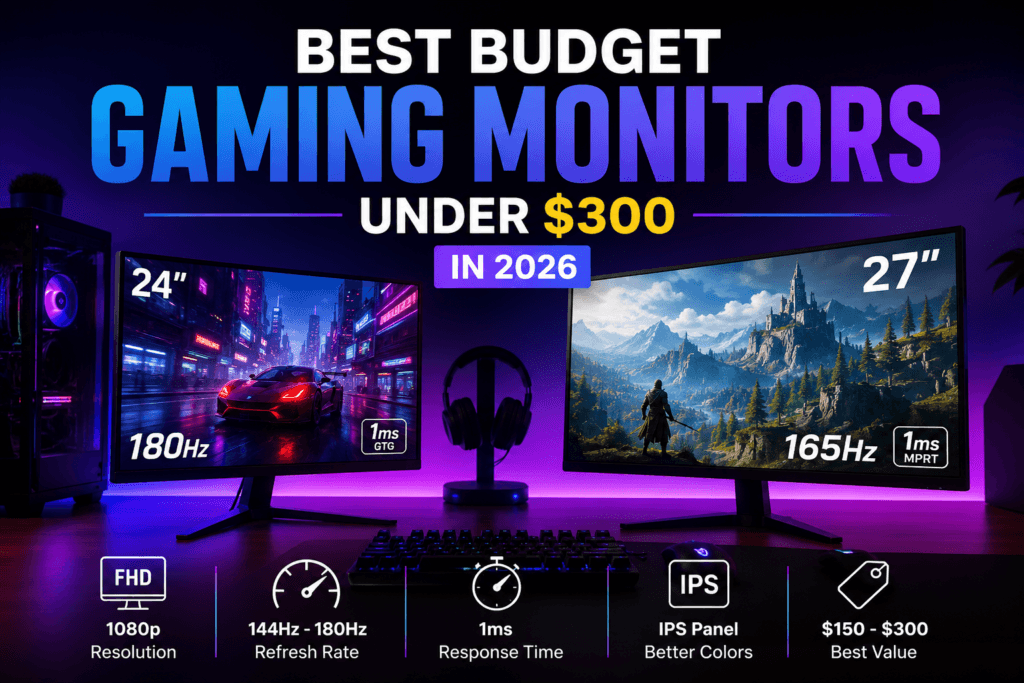
Your GPU can only show you what your monitor lets it. If you’ve built a solid budget rig but you’re still gaming on an old 60Hz panel, a monitor upgrade is often the single biggest visible improvement you can make – and in 2026, under $300 genuinely buys features that used to be premium-only: Mini LED HDR, 200Hz+ refresh rates, and USB-C connectivity.
We compared five standout budget picks across panel quality, refresh rate, and real-world value. Here’s what’s actually worth buying.
🔥 What $300 Actually Buys You in 2026
- Mini LED HDR: genuine local-dimming HDR is now available well under $300, not just on premium panels
- Refresh rate floor: 180Hz+ is now the norm for 1440p gaming monitors in this price range
- Panel type matters more than resolution: a well-tuned 1080p IPS panel can look and feel better than a mediocre 1440p one
📦 All five are available directly on Amazon, often with seasonal deals pushing them below sticker price.
📊 Quick Comparison Table
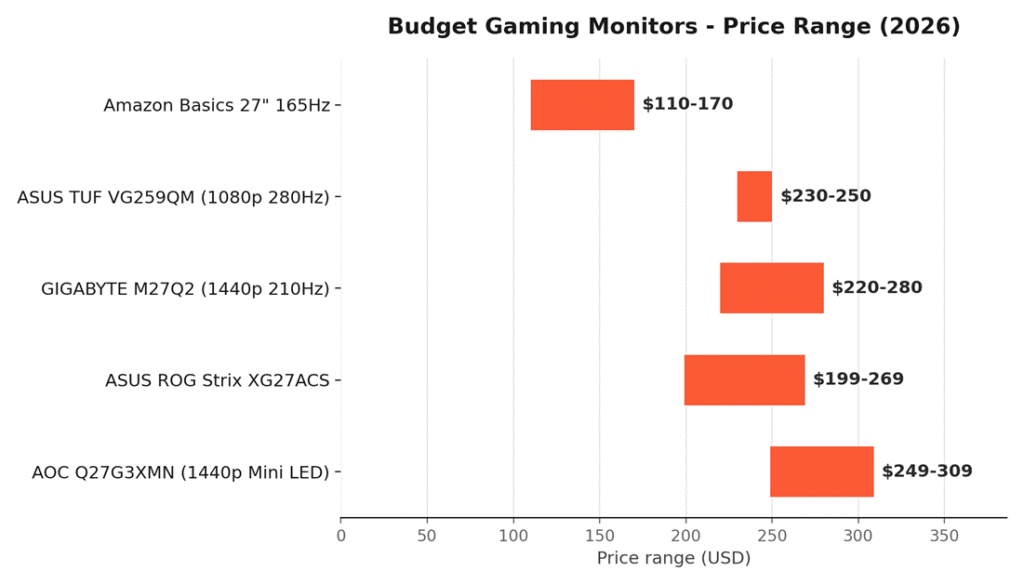
| Monitor | Resolution | Best For | Refresh Rate | Price |
| 🛒 AOC Q27G3XMN | 1440p Mini LED | Best Overall | 180Hz | ~$249–309 |
| 🛒 ASUS ROG Strix XG27ACS | 1440p | Best Premium Features | 180Hz | ~$199–269 |
| 🛒 GIGABYTE M27Q2 | 1440p | Best High Refresh | 200Hz (OC 210Hz) | ~$220–280 |
| 🛒 ASUS TUF VG259QM | 1080p | Best for Competitive FPS | 280Hz (OC) | ~$230–250 |
| 🛒 Amazon Basics 27″ 165Hz | 1080p | Cheapest Pick | 165Hz | ~$110–170 |
Prices fluctuate with Amazon deals — check the live listings for current pricing.
- All five support adaptive sync (FreeSync and/or G-SYNC Compatible) to eliminate screen tearing
- The three 1440p picks give noticeably sharper detail than the 1080p options, at the cost of needing a somewhat stronger GPU to hit high frame rates
🏆 1. AOC Q27G3XMN — Best Overall
The 🛒 AOC Q27G3XMN is the rare budget monitor that genuinely earns comparisons to far pricier displays — real Mini LED local dimming at a price that used to only get you basic edge lighting.
Why it’s here:
- 336-zone Mini LED backlight with VESA DisplayHDR 1000 certification — real HDR, not a checkbox rating
- 1440p resolution with up to 180Hz refresh rate (via DisplayPort) and 1ms response time
- Deep blacks and high peak brightness that hold up even in bright rooms
- FreeSync Premium adaptive sync for tear-free gameplay
Good for: Anyone who wants the single biggest visual upgrade per dollar, especially for HDR-supported games.
⭐ 2. ASUS ROG Strix XG27ACS — Best Premium Features
The 🛒 ASUS ROG Strix XG27ACS packs USB-C connectivity and ASUS’s gaming software suite into one of the most frequently discounted 1440p monitors on the market.
Why it’s here:
- USB Type-C with DP Alt Mode — single-cable video and charging for compatible laptops
- Fast IPS panel with 180Hz refresh rate and 1ms response time
- Extreme Low Motion Blur Sync (ELMB) works alongside G-SYNC Compatible for sharper motion
- DisplayHDR 400 and 133% sRGB color coverage
Good for: Buyers who want IPS color accuracy plus modern connectivity, and who watch for frequent sale pricing.
⚡ 3. GIGABYTE M27Q2 — Best High Refresh
The 🛒 GIGABYTE M27Q2 pushes 1440p refresh rates further than most budget competitors, backed by Quantum Dot color and a genuinely useful KVM feature.
Why it’s here:
- 200Hz native refresh rate, overclockable to 210Hz
- Type-C KVM switch — control two connected devices with one keyboard and mouse
- Quantum Dot technology for wider, more vibrant color than standard IPS
- Built-in tactical gaming features: crosshair overlay, timer, PIP/PBP
Good for: Gamers who also use the monitor for a second PC or laptop and want to avoid constantly swapping cables.
🎯 4. ASUS TUF VG259QM — Best for Competitive FPS
If your GPU can push high frame rates in competitive shooters, the 🛒 ASUS TUF VG259QM is built to actually show them — few budget monitors reach its refresh rate ceiling.
Why it’s here:
- 240Hz native, overclockable to 280Hz — among the fastest refresh rates in this price range
- Fast IPS panel with 1ms response time and ELMB Sync for reduced motion blur
- G-SYNC Compatible certification for tear-free high-FPS gameplay
- 1080p resolution keeps GPU demands lower, making high frame rates easier to sustain
Good for: Competitive FPS players prioritizing raw refresh rate and motion clarity over resolution.
🪶 5. Amazon Basics 27″ 165Hz — Cheapest Pick
For well under $200, the 🛒 Amazon Basics 27″ 165Hz monitor covers the fundamentals without cutting the corners that would actually hurt your experience.
Why it’s here:
- 165Hz refresh rate with 1ms response time — a genuine upgrade over any 60Hz display
- IPS panel for decent color and viewing angles at this price
- Adaptive Sync support to reduce tearing
- Two HDMI ports plus DisplayPort for flexible connectivity
Good for: First monitor upgrades, secondary displays, or anyone who wants higher refresh rate gaming on the tightest possible budget.
❓ Frequently Asked Questions
Should I prioritize resolution or refresh rate on a budget?
Refresh rate first for competitive games, resolution first for slower-paced or visually detailed titles. A 1080p 240Hz+ monitor will feel more responsive in fast shooters, while a 1440p 180Hz monitor looks noticeably sharper in open-world or story-driven games.
Is Mini LED HDR actually worth it on a budget monitor, or is it a marketing checkbox?
It depends entirely on dimming zone count — a Mini LED display like the AOC Q27G3XMN with 300+ zones delivers real HDR contrast, while a monitor with an edge-lit backlight and a basic DisplayHDR 400 badge often shows little visible difference from SDR. Check the zone count, not just the HDR label.
Do I need G-SYNC or FreeSync specifically, or does either work with any GPU?
Most modern monitors labeled “G-SYNC Compatible” work fine with FreeSync-only certification too, since both rely on the same VESA Adaptive-Sync standard — check that your specific GPU (NVIDIA or AMD) is listed as compatible with the monitor before assuming either label guarantees support.
Is 8-bit color noticeably worse than 10-bit on a budget monitor?
In practice, no — most budget monitors use 8-bit panels with FRC (dithering) to simulate 10-bit color, and the visible difference in games is minimal. Panel quality, color gamut coverage, and calibration matter far more than the bit-depth spec.
🔗 Related Reading
- Best Budget Monitors for PC Gaming in 2026 – Smooth, Sharp, and Affordable
- How to Set Up Dual Monitors on Windows 11 Like a Pro
- Best Gaming PC Build Under $1000 in 2026 (AMD Focused)
⚔️ Final Verdict
For most people upgrading from an old 60Hz monitor, the AOC Q27G3XMN delivers the biggest all-around leap — real HDR, sharp 1440p resolution, and a fast refresh rate in one package. If you want the fastest possible motion clarity for competitive shooters, the ASUS TUF VG259QM’s 280Hz ceiling is hard to beat. Want modern connectivity and IPS accuracy? ASUS ROG Strix XG27ACS. Need a KVM for a two-device setup? GIGABYTE M27Q2. And if your budget is tight, the Amazon Basics 165Hz monitor still delivers a genuine upgrade over any 60Hz display for well under $200.
As an Amazon Associate, PC Wizard Hub earns from qualifying purchases made through the links above.