
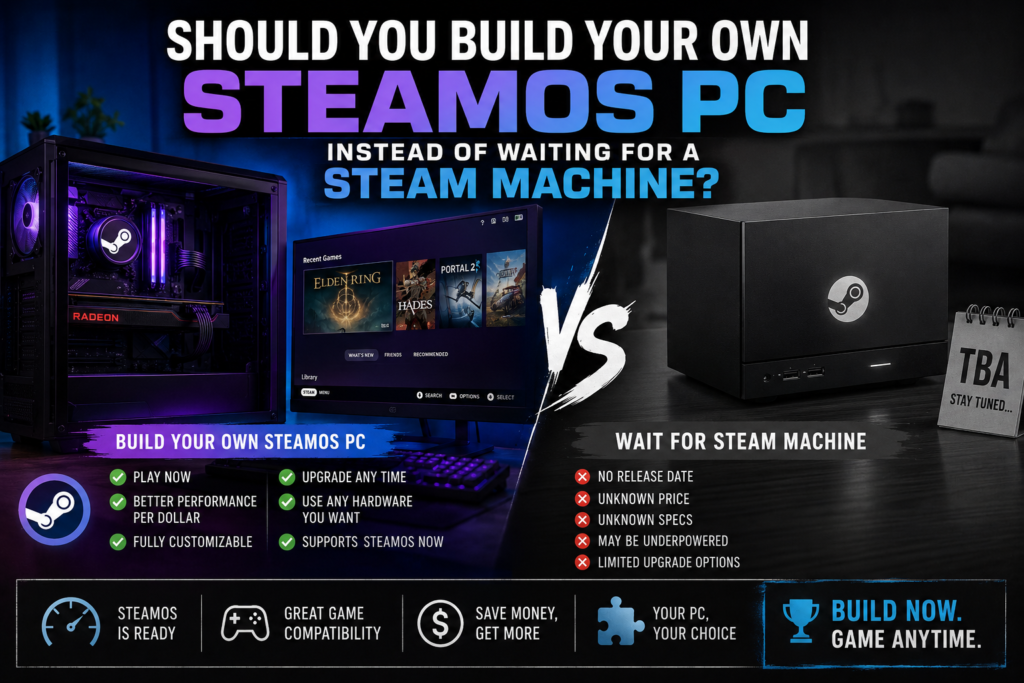
Valve’s Steam Machine launched at $1,049, runs through a randomized reservation lottery instead of normal retail sales, and the waitlist is already expected to stretch into 2027. Naturally, PC builders are asking the obvious question: why wait for a lottery when you can build a SteamOS PC yourself? The honest answer is more nuanced than “just build your own and save money” — largely because of the same RAM and GPU price pressure we’ve covered in recent articles.
Here’s the real cost breakdown, what you gain and lose by going DIY, and who should actually consider it.
⚡ Quick Answer
- The Steam Machine: $1,049 (512GB) or $1,349 (2TB), RTX 3060-class performance, sold via a randomized reservation lottery with waits reportedly stretching into 2027
- DIY cost reality: GamersNexus found an equivalent DIY build costs only about 7% less than the Steam Machine at current component prices — the RAM and GPU price surges have eaten most of the traditional DIY savings
- The real advantage of DIY: no lottery wait, and you can spec beyond the Steam Machine’s fixed hardware if you want more performance
- The real advantage of buying: Valve is selling at cost with no markup, and it’s a known-quantity, pre-validated SteamOS experience out of the box
📊 What You Actually Get for $1,049
The Steam Machine ships with RTX 3060-class graphics performance, near-silent acoustics (confirmed by GamersNexus benchmarking), and SteamOS with Proton, Valve’s compatibility layer that runs roughly 90% of the Steam library without modification. Valve has stated the device is priced at cost based on actual component and manufacturing costs — not marked up the way console hardware often is before recouping margin through software.
- 512GB model: $1,049
- 2TB model: $1,349
- Steam Controller bundle: adds roughly $79 to either configuration
⚠️ The Catch: Kernel-Level Anti-Cheat Games Don’t Work
Before comparing costs, this matters more than price for a lot of buyers: SteamOS — whether on a Steam Machine or a DIY build — cannot run games using kernel-level anti-cheat software. That currently rules out Valorant, League of Legends, the entire Call of Duty franchise, Battlefield 6, and EA Sports titles. If any of those are in your regular rotation, neither the Steam Machine nor a SteamOS DIY build is a full replacement for a Windows gaming PC — that limitation applies equally to both options.
💰 The DIY Cost Breakdown
Here’s a roughly equivalent (and in a few places, slightly better-specced) DIY parts list, priced at current market rates:
| Part | Pick | Price |
| CPU | 🛒 AMD Ryzen 5 7500F | ~$130 |
| Motherboard | 🛒 ASRock B650I Lightning WiFi | ~$220–250 |
| GPU | 🛒 Gigabyte RTX 4060 Eagle OC | ~$309 |
| RAM | 🛒 Corsair Vengeance 32GB DDR5 | ~$150–180 |
| SSD | 🛒 Samsung 990 Pro 1TB | ~$220–250 |
| Case | 🛒 Fractal Design Terra (Mini-ITX) | ~$150–180 |
| PSU | 🛒 Corsair SF600 SFX Gold | ~$110–125 |
Prices fluctuate with Amazon deals and ongoing memory/GPU price volatility — check live listings before buying.
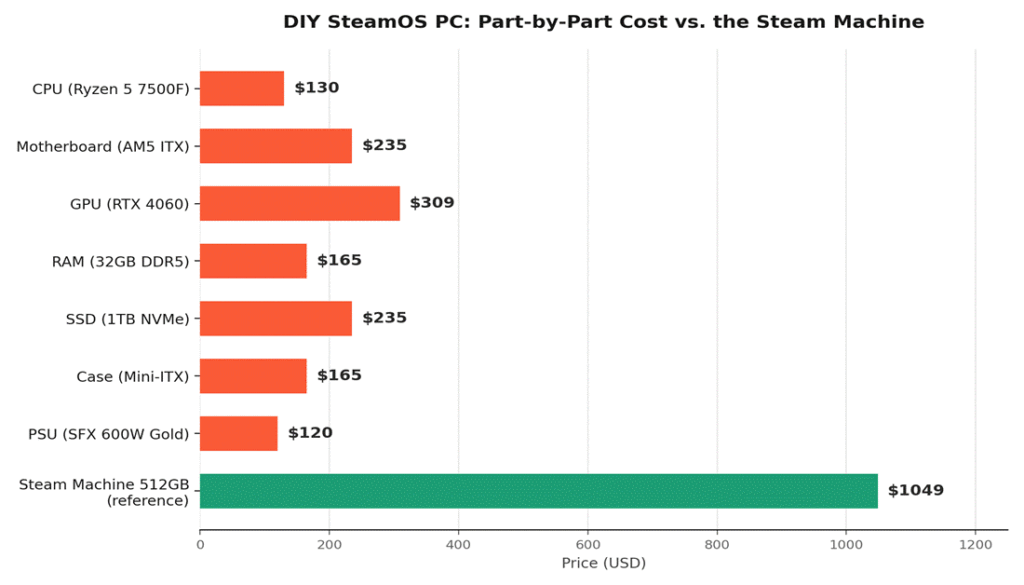
Add it up and this parts list lands around $1,300–$1,450 — more than the Steam Machine, not less. That’s specifically because this build uses an RTX 4060 (meaningfully faster than the Steam Machine’s RTX 3060-class performance) and 32GB of RAM (double a likely 16GB baseline) for extra headroom. Trim the GPU to a more directly equivalent RTX 3060-tier card and drop to 16GB RAM, and the total lands close to GamersNexus’s reported ~7% DIY discount versus the Steam Machine — which is to say, barely cheaper at all right now.
🧭 Why DIY Isn’t the Slam-Dunk Savings It Used to Be
Historically, building your own PC beat buying a fixed-configuration device by a wide margin. That gap has narrowed sharply in 2026 for a specific reason: RAM and GPU prices have both surged (DRAM contract prices rose 90–95% in Q1 2026 alone, and Nvidia has raised GPU pricing three times this year), while Valve locked in Steam Machine component sourcing and pricing before much of that increase hit. The DIY builder now pays closer to today’s inflated component prices, while the Steam Machine reflects an earlier, more favorable cost basis Valve secured for its production run.
✅ Who Should Build Their Own Instead
- You don’t want to wait for the reservation lottery — waitlists are reportedly running into 2027 for latecomers
- You want performance beyond RTX 3060-class — DIY lets you spec up to an RTX 4060, 4070, or beyond
- You already own some compatible parts — reusing an existing case, PSU, or SSD immediately tips the math in DIY’s favor
- You want to run Windows dual-boot or other distros alongside SteamOS — more flexible than Valve’s fixed appliance
✅ Who Should Just Buy (or Wait for) the Steam Machine
- You want the simplest possible path — no parts research, no assembly, no driver troubleshooting
- You’re fine with RTX 3060-class performance — it’s genuinely capable for 1080p/1440p gaming, just not cutting-edge
- You value Valve’s at-cost pricing — there’s no markup to negotiate around, unlike most fixed-configuration PCs
- You want guaranteed acoustic and thermal performance — already validated and benchmarked, versus a DIY build’s case/cooling being on you to get right
❓ Frequently Asked Questions
Is SteamOS hard to install on a regular PC?
It’s more involved than installing Windows, but well-documented — Valve and the SteamOS community provide install guides, and it’s built on the same base as the Steam Deck’s OS. Expect more manual driver and compatibility troubleshooting than a plug-and-play Steam Machine.
Can I just install SteamOS on my existing gaming PC instead of building new?
Yes, if your hardware is compatible (mainly AMD or recent Nvidia GPUs with driver support) — you don’t need to build a new system specifically to run SteamOS, and this sidesteps the cost comparison entirely since you’re not buying new parts.
Will DIY component prices come back down, making this a better deal later?
Not predictably in the near term — analysts tracking the RAM shortage expect elevated pricing to persist into at least mid-2027, and GPU prices are trending upward, not down, through the rest of 2026. The current cost gap between DIY and the Steam Machine is unlikely to widen back in DIY’s favor soon.
Does the Steam Machine work with any keyboard and mouse, or just the Steam Controller?
It supports standard USB and Bluetooth keyboards and mice like any PC — the Steam Controller is an optional bundle, not a requirement.
🔗 Related Reading
- Why RAM and SSD Prices Are Skyrocketing in 2026 (And What Budget PC Builders Should Actually Do)
- Best Budget AM5 CPU and Motherboard Combos in 2026
- RTX 4060 vs RX 7600: Which Budget GPU Should You Buy in 2026?
- Best Gaming PC Build Under $1000 in 2026 (AMD Focused)
⚔️ Final Verdict
A year ago, this would have been an easy call in DIY’s favor. Right now, the math is close enough that the decision comes down to what you actually value: skip the lottery and get more performance headroom by building your own, or accept RTX 3060-class performance and Valve’s validated, at-cost hardware without the research and assembly. Neither choice is a clear financial win over the other at today’s component prices — which is itself the real headline here.
Note: pricing in this article reflects market conditions as of early August 2026, a period of significant RAM and GPU price volatility covered in our related articles. Component prices may shift meaningfully by the time you read this — check current listings before finalizing a build.