
If you’ve ever built or upgraded a PC, you’ve probably heard someone say “don’t forget the thermal paste” — but most guides stop at “it’s the grey stuff between your CPU and cooler” and leave it there. That’s not enough to actually help you pick one or know when yours needs replacing.
This guide covers what thermal paste actually does at a physical level, the real differences between paste types, how long yours will last, the application method that actually matters, and three specific pastes worth buying depending on your budget.
🔬 What Is Thermal Paste, Really?
Thermal paste (also called thermal compound or thermal grease) is a heat-conductive filler applied between your CPU’s heat spreader and your cooler’s cold plate. Even surfaces that look perfectly flat and polished have microscopic peaks and valleys — under a microscope, both the CPU lid and the cooler base are covered in tiny imperfections. Air is a poor conductor of heat, so those gaps would otherwise trap insulating pockets of air between two surfaces that are supposed to be transferring heat directly.
Thermal paste fills those gaps with a material that conducts heat far better than air, so the heat generated inside the CPU die can actually make it to the cooler instead of building up.
What thermal paste is not: it isn’t glue, and it isn’t there to physically bond the cooler to the CPU. Mounting pressure from your cooler’s bracket does that job. Paste is purely a heat-transfer medium.
🧪 The Three Types of Thermal Paste (and Why It Matters)
Not all thermal paste is the same, and the type affects both performance and risk:
| Type | Conductivity | Electrically Conductive? | Best For |
| Silicone/ceramic-based | Low–moderate | No | Stock coolers, budget builds, low-risk reapplication |
| Carbon/metal-oxide hybrid | High | No | Most gaming PCs — the sweet spot of performance and safety |
| Liquid metal | Extremely high | Yes | Overclockers and direct-die cooling only — can short a board if it spreads onto a socket or contacts |
Most budget and mid-range builds should stay in the carbon/metal-oxide hybrid category — it’s where you get a real, measurable temperature drop over stock paste without the liquid metal’s risk of shorting components if it migrates outside the die.
⏰ When Should You Actually Replace It?
- Every time you remove the cooler — reseating without fresh paste is one of the most common causes of a sudden temperature spike after a “simple” upgrade
- Every 2–4 years for a normal gaming PC that isn’t overclocked (modern pastes last considerably longer than older 1–2 year advice suggested)
- Every 1–2 years if you’re running sustained high loads (rendering, overclocking, or a case with poor airflow)
- Immediately, if you notice a sudden 10°C+ idle or load temperature increase with no other explanation
Why it’s here:
- Idle temps creeping up over time with the same ambient room temperature
- Cracked, dry, or crumbly paste visible if you ever remove the cooler
- A pre-applied thermal pad on a stock cooler that’s several years old (pads degrade faster than syringe paste)
👷 How to Apply It the Right Way
The application pattern actually matters more than most guides admit — here’s how the common methods compare:
| Method | Best For | Risk |
| Small dot in the center | Most modern CPUs (AM4/AM5/LGA) — cooler pressure spreads it evenly | Minimal, if paste isn’t too thick a bead |
| Thin line across the die | Larger CPU dies (Threadripper, HEDT) | Slight under-coverage at corners if too short |
| X or cross pattern | Very large IHS surfaces | Can trap air pockets at the center if overdone |
| Manual spread with a spatula | Only when the paste is very thick/high-viscosity | Highest risk of introducing air bubbles — most modern pastes explicitly say not to do this |
For nearly all builds: a single pea-sized dot in the center, then mount the cooler with firm, even pressure. Don’t spread it by hand unless the paste’s own instructions say to — most current-generation pastes are formulated to spread themselves under mounting pressure.
Step by step:
- Power off, unplug, and remove the old cooler
- Clean off old paste completely using isopropyl alcohol (90%+) and a lint-free cloth or coffee filter — cotton balls leave fibers behind
- Apply a pea-sized dot of new paste to the center of the CPU
- Mount the cooler in one motion with even downward pressure, then tighten screws in a diagonal/alternating pattern (like a wheel lug pattern), not one side at a time
📊 3 Thermal Pastes Actually Worth Buying in 2026
| Paste | Type | Best For | Price |
| Noctua NT-H2 | Hybrid metal-oxide | Easiest application, best long-term stability (rated 5 years) | $$ |
| Arctic MX-6 | Carbon-based | Best value-for-performance, great for most gaming builds | $ |
| Thermal Grizzly Kryonaut | Nano-aluminum hybrid | Overclockers and enthusiasts chasing the lowest possible temps | $$$ |
Prices fluctuate — check current Amazon pricing before buying.
- All three are non-electrically-conductive, so a small amount of spillover onto the CPU lid (not the socket) won’t damage anything
- None require manual spreading — mounting pressure handles distribution
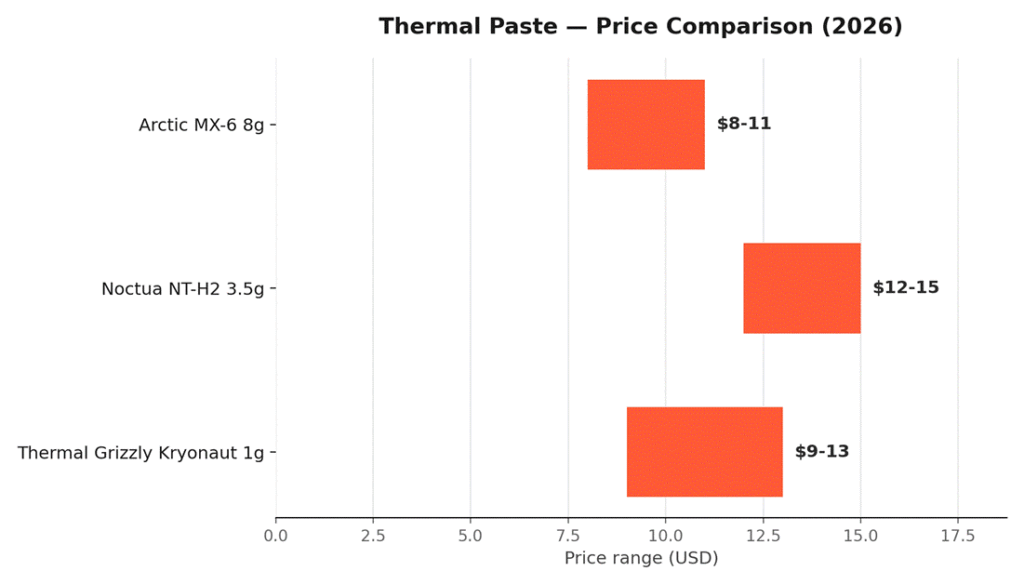
Our pick for most readers: the Arctic MX-6. It sits in the sweet spot of price and performance for a typical AM5 or LGA1700 gaming build, and you won’t notice a real-world difference versus the pricier Kryonaut unless you’re actively overclocking.
❓ FAQ
Can I mix two different thermal pastes?
No — clean off the old paste completely before applying new paste, even if it’s the same brand. Mixing formulas can reduce performance or cause separation over time.
Does more paste mean better cooling?
No. Too much paste can actually insulate rather than conduct, and excess paste squeezed out to the edges of the CPU risks touching the socket or motherboard. A pea-sized dot is correct for the vast majority of consumer CPUs.
Is liquid metal worth it for a normal gaming PC?
Generally no. The temperature gain over a good hybrid paste like the ones above is usually only a few degrees, and liquid metal carries a real risk of electrical short if it migrates — not worth it unless you’re already comfortable working with direct-die cooling.
My temps are still high after repasting — what else could it be?
Check case airflow, fan curves, and whether the cooler is actually rated for your CPU’s TDP. Paste alone can’t fix an undersized cooler.
🔗 Related Reading
- How to Fix a PC That Randomly Turns Off While Gaming
- PC Building 101: How to Build Your First PC as a Beginner
- How to Choose the Right PC Parts for Your First Build
- How to Clean Your PC Safely (Step-by-Step Guide for Beginners)
🏁 Final Verdict
Thermal paste is one of the cheapest, smallest components in your entire build — and one of the few that can single-handedly cause thermal throttling if neglected. For most gaming PCs, the Arctic MX-6 hits the best balance of price and performance; step up to Kryonaut only if you’re overclocking.
As an Amazon Associate, PC Wizard Hub earns from qualifying purchases made through the links above.